A payment API key works like a cash card with no PIN. Whoever sends it can create invoices, read your payment data and, if you use payouts, move money out of your balance. Payment API security therefore comes down to three habits: keep the key on your own servers, let the API accept it only from those servers' addresses, and confirm every webhook by reading the payment back before you act on it.
This guide is for engineering leads and heads of payments at PSPs, EMIs, banks and merchants who are connecting a crypto payment API that settles in euros. It shows how to restrict a key by IP address and CIDR range, where the key should live, how to check webhooks, and which controls belong around payouts. Examples use the ItisPay API and dashboard (demo data).
Key moments
In short
- An API key is a bearer credential. GitGuardian counted 28.65 million new hardcoded secrets in public GitHub commits in 2025, so plan for a key leaking, not only for keeping it safe.
- An IP allowlist makes a leaked key useless outside your network. List the smallest IPv4 or IPv6 ranges that cover your real outbound addresses; an empty list allows every address.
- A webhook is a notice, not proof. Re-read the invoice by its ID with your key before you ship goods or credit an account.
- Payouts need human controls on your side: two-step sign-in, saved beneficiary IBANs and wallets, and a second approver above a set amount.
Why is a leaked payment API key so dangerous?#
A leaked payment API key is dangerous because the key is the whole identity of your integration. The ItisPay API, like most payment APIs, authenticates each request with one header, Api-key, and the same authentication covers invoices, payouts to an IBAN or wallet, and crypto withdrawals to an external address. That is why the documentation asks that the key "is not exposed in client-side code or public repositories."
In practice keys leak through ordinary places: code, logs and chat. According to GitGuardian's State of Secrets Sprawl 2026 (March 2026), 28.65 million new hardcoded secrets were added to public GitHub commits in 2025, 34% more than a year earlier. When GitGuardian retested secrets leaked in 2022, more than 64% were still valid in January 2026. Teams publish keys and then forget to replace them.
The OWASP API Security Top 10 (2023) ranks "Broken Authentication" second and warns that "the authentication mechanism is an easy target for attackers since it's exposed to everyone." Verizon's 2025 Data Breach Investigations Report names credential abuse the most common initial attack vector, at 22%. A secret string alone is a thin defence, so the rest of this guide adds layers that still hold once the string is out.
How does an IP allowlist protect an API key?#
An IP allowlist, sometimes called an IP whitelist, protects the key by tying it to places as well as to a string. The API accepts the key only when the request comes from an address you listed; a copy of the key on a developer's laptop, a CI log or a paste site does not work.
In the ItisPay dashboard the setting sits under Projects, then Settings, then Security, in the field API Allowed IPs. The field takes a comma-separated list of single addresses and CIDR blocks. Its help text says: "Leave empty to allow all IPs. Both IPv4 and IPv6 are supported." The same list can be set when a project is created through the API, in the api_allowed_ips field, and an invalid entry such as 256.256.256.256 is refused with a validation error rather than saved.
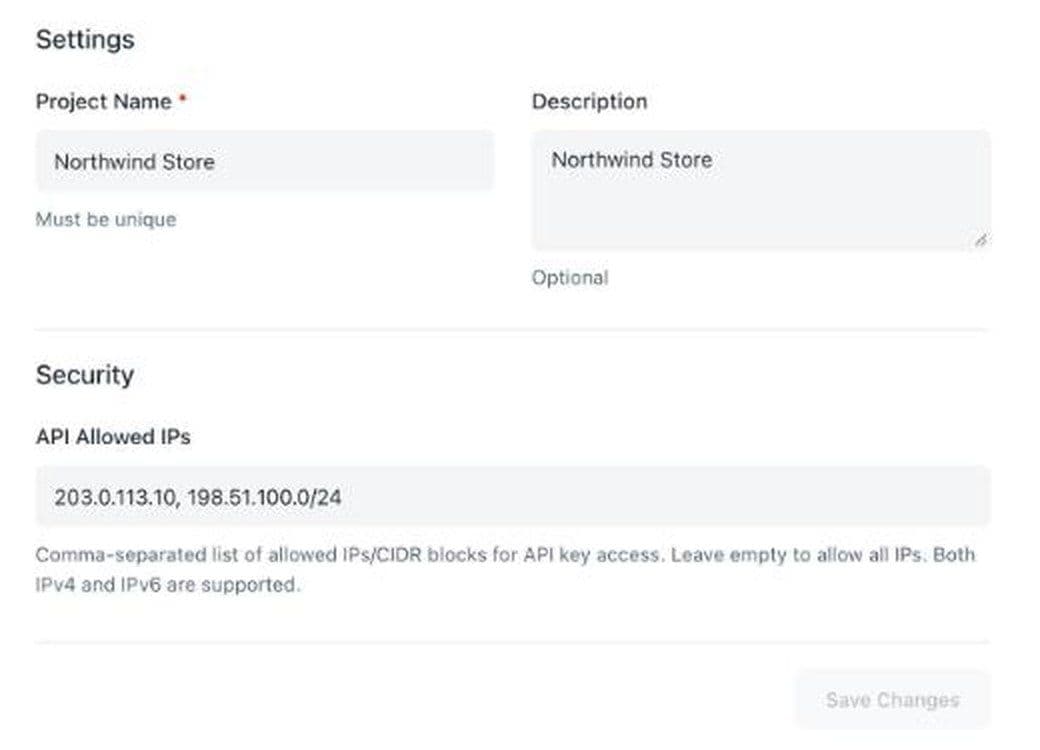
The empty default matters. A new project accepts its key from anywhere until someone fills in the field, so put that step on the go-live list, not on the list of things to tidy up later. The demo values in the screenshot, 203.0.113.10 and 198.51.100.0/24, come from ranges that RFC 5737 reserves for documentation; your list will hold your own public addresses. Each project has its own 64-character key and its own list, so production can stay locked to two or three servers while a test project accepts a wider set.
How do you write CIDR ranges for IPv4 and IPv6?#
Write the smallest range that covers every address your servers really use to reach the API. Most allowlist trouble comes from a range that is far too wide, or from an outbound path somebody forgot.
Reading a prefix#
A CIDR block is an address followed by a slash and a prefix length. RFC 4632 defines the prefix length as the number of significant bits: 192.168.99.0/24 fixes the first 24 bits and leaves 8 free, which gives 256 addresses. Each bit you take off the prefix doubles the block. A /32 is one IPv4 address, a /29 is 8, a /24 is 256 and a /16 is 65,536.
IPv6 works the same way with 128 bits. A /128 is one address. RFC 4291 sets the interface part of most IPv6 addresses at 64 bits, so a server's network is normally a /64 and the host can change its address inside it, for example when the operating system generates temporary addresses. If your host's IPv6 address changes and that /64 is yours alone, list the /64 rather than a single /128. The documentation range for IPv6 examples is 2001:db8::/32 (RFC 3849), so never copy it into a real allowlist.
Finding your real outbound address#
The address that matters is the one the API sees, not the one your server reports about itself. Behind a cloud NAT gateway or a corporate firewall, many machines share one or two public addresses. Serverless functions often leave from a shared pool unless you route them through a fixed egress. Check from each environment by calling a "what is my IP" service, or read the source address in your firewall logs, then list exactly that.
| Setup | What to list | Verdict |
|---|---|---|
| One server with a static public IPv4 address | That address as /32 or plain | Works |
| Several servers behind a cloud NAT gateway | The NAT gateway's public addresses | Works |
| IPv6 host with changing addresses | The host's /64, if no one else uses it | Depends |
| Office network for manual testing | The office's fixed address, if the provider guarantees it | Depends |
| Serverless functions without fixed egress | Route them through a NAT with a static address first | No |
| A cloud provider's whole regional range | Nothing; it covers other customers too | No |
Before you save a change, add the new address first, deploy, confirm traffic flows, and only then remove the old one. Saving a list that leaves out your live servers blocks your own checkout.
Where should the API key live, and who sees it?#
The key belongs on your servers, in a secret store, and nowhere else. Never ship it inside a browser page or a mobile app, because anyone can read it there. Keep it out of URLs too: the OWASP REST Security Cheat Sheet warns that a key in a URL can be captured in web server logs. Your checkout page talks to your back end; the back end talks to the payment API.
Load the key from a secret manager or environment variables at start-up, not from a config file in the repository. If you host code on GitHub, turn on push protection: according to GitHub's documentation, when it "detects a potential secret during a push attempt, it will block the push."
Keep one key per environment. Each ItisPay project carries its own key and allowlist, so separate projects for production and staging mean a leaked staging key cannot touch live payments. Limit who can see the production key. The EBA's 2019 guidelines on ICT security set the rule of "need-to-know" access with "minimum access rights", technical users included; since 2025 DORA carries that duty for most payment firms.
Then write down how you would replace the key, before you need to. The OWASP Cryptographic Storage Cheat Sheet advises rotating keys after a set period and whenever compromise is suspected, and making sure "the code and processes required to rotate a key are in place before they are required."
How should you verify webhooks from a payment API?#
Treat a webhook as a notice that something changed, never as proof that you were paid. Anyone who learns your callback URL can send it a fake "completed" message. The safe pattern is to read the invoice back from the API with your own key and act on what the API returns.
When you create an ItisPay invoice, the callback_url field sets the address for status updates. When a webhook arrives, take the invoice ID from it, call GET on the invoice by ID, and ship or credit only if that response shows the status you expect and the amount you priced. The documentation describes this endpoint as returning payment status and blockchain details "for display to users or verification."
A few rules keep the handler clean:
- Accept webhooks over HTTPS only and reject plain HTTP.
- Make the handler idempotent. Store each processed invoice ID and status, and skip repeats, because providers resend notices.
- Answer fast and do the work in a queue, so a slow database does not trigger retries.
- If a provider signs its webhooks with HMAC, a keyed hash defined in RFC 2104, recompute the signature and compare it with a constant-time function. The OWASP Webhook Security Cheat Sheet is blunt: "Never use ==: it leaks timing information and can turn the endpoint into a signing oracle." Reject messages whose signed timestamp is too old.
Test before go-live. ItisPay has an endpoint that simulates a status change for a real test invoice and another that resends the latest webhook for an invoice or order ID, so you can check retries and duplicates without real money.
How do you lock down payouts and dashboard access?#
Payouts are where a stolen key turns into lost money, so add human controls around them. Through the ItisPay payouts endpoint, a fiat payout goes to a beneficiary IBAN and a crypto payout to a wallet address, both from your available balance. The API does what the request says; deciding whether a request is legitimate is your job.
Controls that work on your side:
- Two-step sign-in for everyone with dashboard or payout access. EU payment law already uses this idea for payment users: the PSD2 rules on strong customer authentication require at least two independent elements from knowledge, possession and inherence. Apply the same standard to your own staff.
- Saved beneficiaries. Keep your own list of approved IBANs and wallet addresses, and let your payout service send only to entries on it. A new beneficiary goes through a separate approval, ideally with a cooling-off period.
- A second approver above a threshold. One person prepares, another approves. Set the amount by your own risk appetite.
- A separate payout service. Run payouts from one service with its own fixed address on the allowlist, apart from the checkout servers that create invoices.
| Control | What it stops | Verdict |
|---|---|---|
| IP allowlist on the key | Use of a leaked key from outside your network | Works |
| Key only on the server | Key theft from browsers, apps and repositories | Works |
| Re-reading the invoice after a webhook | Fake "paid" notices | Works |
| Saved beneficiaries and second approver | Payouts to an attacker's IBAN or wallet | Works |
| Any of these alone against a hacked server inside the list | Theft by someone already inside | No |
What do DORA and PCI DSS expect from API access?#
If you are a regulated EU financial firm, these controls are not optional extras. The Digital Operational Resilience Act (DORA, Regulation (EU) 2022/2554) has applied since 17 January 2025, according to the EBA. Its Article 9 asks firms to "implement policies that limit the physical or logical access" to ICT assets and to "implement policies and protocols for strong authentication mechanisms." An allowlisted, server-only key with a rotation plan is the kind of evidence an auditor asks to see.
PCI DSS covers card data, not crypto invoices. If the same team also runs card payments, requirement 8.4.2 asks for multi-factor authentication on all access into the cardholder data environment, and the future-dated requirements of version 4.0 became mandatory on 31 March 2025.
Where do payment API security controls stop working?#
These controls narrow the ways in. They do not make an integration safe on their own. Even for webhook senders, the OWASP webhook sheet calls IP allowlisting an "extra layer only", because "a shared egress IP is not proof of identity."
Where it does not help
- A hacked server on the allowlist. The attacker sends requests from a trusted address with the real key.
- Shared outbound addresses. If other tenants leave the cloud from the same NAT address, the allowlist cannot tell them apart from you.
- A stolen dashboard password without two-step sign-in. The attacker skips the API entirely.
- Personal data in invoice fields. ItisPay's public invoice endpoint returns full details for open invoices without a key, so keep customer names and emails out of the order name.
How do you start a secure integration in one afternoon?#
You can finish the technical part of a secure integration in an afternoon if you follow a fixed order. The steps below use ItisPay; the same order works with any provider.
- Create a test project and a separate production project, each with its own key.
- Store both keys in your secret manager and load them on the server only.
- Find the public outbound address of each environment and enter it in API Allowed IPs.
- Create an invoice from the back end: POST to https://api.itispay.com/api/v1/invoices with the Api-key header, a unique order_id, fiat_amount with fiat_currency EUR, the coin in currency, and your callback_url.
- Build the webhook handler: HTTPS only, idempotent, re-reading the invoice by ID before any action.
- Run the webhook simulation for each status you handle, then the resend endpoint to test duplicates.
- Switch on payouts last, with saved beneficiaries and a second approver.
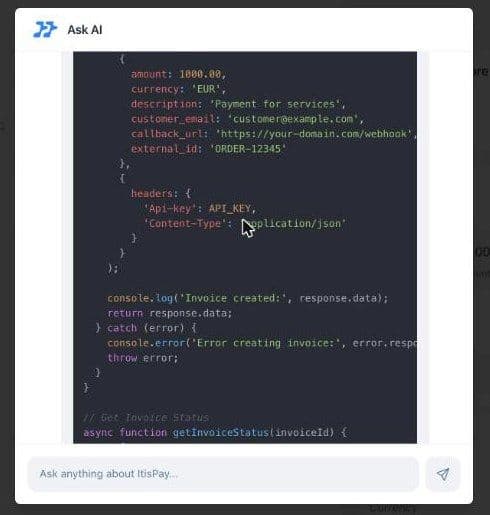
For a quick start, the Ask AI assistant in the dashboard writes sample code on request, such as an invoice call in Node.js with the Api-key header in place. Treat it as a draft: check field names against the API reference before you ship, because the reference, not a generated example, is the contract. ItisPay also publishes an official TypeScript client on npm, @itispay/typescript-client.
If you are wiring this into a wider payment orchestration setup, give each provider its own key, allowlist and webhook handler. The same re-read-by-ID record also feeds crypto payment reconciliation for your finance team.
If you want to accept stablecoin payments and receive euros without building the stack yourself, ItisPay provides the API, invoicing, webhooks and reconciliation, and the first layer of payment API security: keys you can restrict to your own IP addresses. Licensing, KYC and settlement to your IBAN run through our EU-licensed CASP + Payment Institution partner, and most teams go from KYB to first transaction in under a week.
This article is for informational purposes only and does not constitute legal or regulatory advice.