Here is how to accept stablecoin payments and still be paid in euros: you issue an invoice priced in EUR, the payer sends the matching amount of USDC to an address created for that one invoice, and a licensed partner converts it and pays euros to your IBAN. The checkout part takes one API call. The decisions that matter sit around it: how long the invoice stays open, what you do when a payer sends too little, and how your order system learns that the money arrived.
This guide walks through that invoice flow as both sides see it, using screenshots from the ItisPay dashboard with demo data.
In short
- You set the price in EUR; the USDC amount is calculated from the current rate and shown on the invoice.
- Each invoice gets its own address, a countdown and a status: new, pending, paid_partial, completed, expired or cancelled.
- A short payment does not fail the invoice: it is recorded per transfer and the status becomes paid_partial.
- Under MiCA, exchanging crypto for euros is a licensed service, so settlement to your IBAN runs through an authorised CASP.
How to accept stablecoin payments in the EU: what do you need?#
You need three things: a stablecoin issued in line with MiCA, a licensed firm that exchanges it for euros, and software that matches each payment to an order. Taking the coin is easy. Turning it into euros on your account is the regulated part.
The Markets in Crypto-Assets Regulation (MiCA, Regulation (EU) 2023/1114) has applied to stablecoins since 30 June 2024 and in full since 30 December 2024. Under Art. 48, only an authorised credit institution or electronic money institution may issue an e-money token, the MiCA term for a stablecoin tied to one official currency.
USDC qualifies: the ESMA interim MiCA register lists Circle Internet Financial Europe SAS as the issuer of USDC and EURC, authorised by the French ACPR on 1 July 2024. USDT does not appear in that register of authorised issuers (as of 5 November 2026).
Exchanging crypto for euros is a crypto-asset service. Art. 59 of MiCA allows it only for an authorised CASP (crypto-asset service provider) or certain financial firms, such as banks and investment firms, that notify their regulator under Art. 60. A merchant has two routes: get its own CASP licence, or work through a provider that already holds one.
How does a stablecoin invoice work, step by step?#
A stablecoin invoice is a payment request with a fixed amount, its own address and a deadline. Your system creates it, the payer pays it, and a status change tells you when to ship. Here is the full path for a 250 EUR order paid in USDC.
- You create the invoice. Your checkout sends the order ID, the price in EUR and the coin you want (USDC). In ItisPay the call is `POST /invoices`; in the dashboard it is a short form.
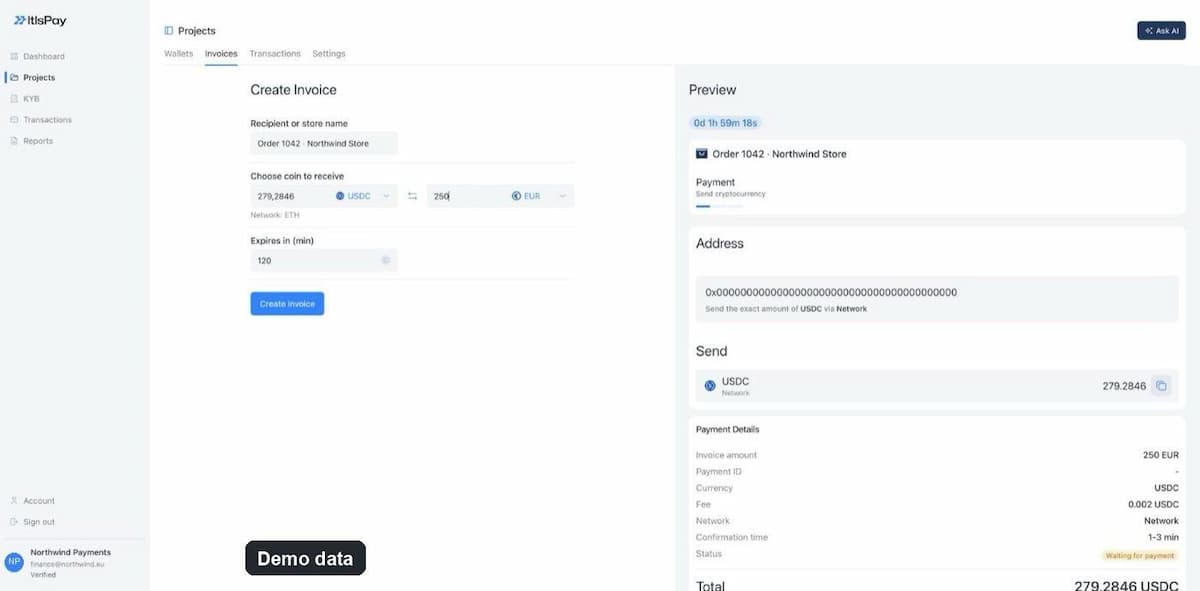
- The amount is converted. The API calculates the USDC amount from the EUR price using current rates. In the demo below, 250 EUR becomes 279.2846 USDC.
- An address is assigned. The invoice gets its own blockchain address on a named network, plus a QR code. Because the address is tied to the invoice, the incoming transfer points to the order.
- The payer sends USDC. They see the exact amount, the network and a countdown, and pay from their wallet or exchange account.
- The status changes. The invoice starts as new and changes, for example, to pending, completed, paid_partial or expired. If you gave a callback URL, status updates are posted to your server as webhooks.
- Euros reach your IBAN. Settlement to EUR on your IBAN runs through the licensed partner, or you keep the stablecoins with it.
| Step | Who acts | What happens |
|---|---|---|
| Create | Merchant system | Order ID, EUR price and coin sent to the API |
| Convert | ItisPay | USDC amount calculated from the current rate |
| Pay | Payer | Exact USDC amount sent to the invoice address |
| Confirm | ItisPay | Transfer detected, status updated, webhook sent |
| Settle | Licensed partner | USDC exchanged, EUR paid to the merchant's IBAN |
The split in the last two rows matters for compliance. ItisPay is the software layer: invoices, statuses, notifications, reconciliation. Holding funds, exchanging them and paying out euros sit with the licensed partner.
What does the payer see on the payment page?#
The payer sees one screen with everything needed to pay without asking you a question: who is charging them, the exact USDC amount, the address, the network and the time left. The right side of the screenshot above is that view.
At the top is a countdown, in the demo 1 hour 59 minutes. Below it are the store name, the address with an instruction to send the exact USDC amount over the stated network, a copy button for the amount, and the payment details: invoice amount in EUR, currency, network and status, which starts as waiting for payment.
Watch the network line. USDC exists on several blockchains, and a transfer sent over a different network than the one on the invoice will not be credited to the invoice and may not be recoverable. If you build your own payment screen, put the network in large type next to the amount.
The payment page shows full details only while payment is still possible. ItisPay's public invoice endpoint returns everything for invoices that are new, pending or paid_partial. Once an invoice is completed, expired or cancelled, it returns only the ID and the status, so an old link no longer shows an address to pay to.
How is the USDC amount calculated from a euro price?#
You price in euros, and the invoice shows the USDC equivalent at the current rate when it is created. The payer is asked for that exact figure, so your accounting starts from a known EUR amount.
In the ItisPay API you send `fiat_amount` with `fiat_currency` set to EUR, which is the only fiat currency supported at the moment, and the API returns the crypto amount. You can invoice a fixed crypto amount instead, but not both in one invoice.
The rates endpoint returns current rates in EUR if you want to show an estimate before checkout. USDC tracks the US dollar, so the USDC figure for a EUR price moves with the EUR/USD rate, and a short expiry limits how far the rate can drift before the payer pays.
How long should a crypto invoice stay open?#
Long enough for the payer to open a wallet and send, short enough that the rate on the invoice is still fair. In the ItisPay dashboard the expiry field is prefilled with 120 minutes; through the API you set it per invoice with `expire_min`.
Match the window to the situation. An online checkout where the payer is already at the screen can use a shorter expiry. A B2B invoice sent by email to a finance team that pays in batches needs longer. When the time runs out, the status becomes expired and the payment page stops showing the address. If an order is voided before payment, cancel the invoice through the API rather than letting it run out, so your records show why it closed.
What happens when a payer sends too little or the wrong coin?#
A partial payment does not fail the invoice. It moves it to paid_partial and records the transfer, and the payment page stays open for the rest. ItisPay invoices support several transactions per invoice, each with its own amount, transaction hash and status.
Small differences happen. Some exchanges deduct their withdrawal fee from the amount sent, and payers sometimes round the figure, so 279.28 arrives instead of 279.2846. The `allowed_error_percent` setting (0 to 100) is the payment error, in percent, that the invoice allows; if you leave it out, a system default applies. Set it too tight and you chase cents; set it too loose and you give away margin on large orders.
The invoice also records what actually arrived. `actual_crypto_amount_paid` holds the amount received, and `currency_paid` shows when the payer used a different coin than the invoice asked for, for example USDT instead of USDC. Write down your rules for those cases before the first one happens.
| Status | What it means | Verdict |
|---|---|---|
| new | Invoice created, nothing received yet | No |
| pending | Payment under way, not settled as paid | No |
| paid_partial | Part of the amount received | Depends |
| completed | Invoice paid | Yes |
| expired | Time ran out before full payment | No |
| cancelled | Closed by you, for example a voided order | No |
The Verdict column answers one question: can you ship the order? For paid_partial, the answer depends on your policy: wait for the rest, ask the payer to top up, or accept the amount and adjust the order.
How do stablecoins become euros on your IBAN?#
Through the licensed partner, which pays euros to your IBAN or holds the stablecoins if you want to keep them. ItisPay provides the API, invoicing and reconciliation; settlement to EUR runs through our EU-licensed CASP + Payment Institution partner.
Before the first payment, the partner runs KYB on your business, a know-your-business check on ownership, directors and activity. KYC, AML and IBANs are handled by the partner, so the regulated exchange is done by an authorised firm rather than by you. If you also need incoming euro accounts per client or per market, virtual IBANs come from the same partner.
Money can also leave the same way it came in. The ItisPay payouts API sends a fiat payout to a bank account or a crypto payout to a wallet from your available balance, which covers refunds, supplier payments and B2B stablecoin payments.
One rule runs underneath. The Transfer of Funds Regulation (EU) 2023/1113, applied since 30 December 2024, requires CASPs to pass and check information on the sender and the recipient with each crypto transfer (Art. 14 and 16). It adds checks for transfers above €1,000 that involve a self-hosted wallet. These checks sit with the licensed partner, not with your checkout, but ask the partner how they affect larger payments.
How do you connect stablecoin payments by API?#
One authenticated request creates an invoice, and one webhook endpoint receives every status change. Most integrations need little more than that. Requests carry your key in an `Api-key` header; keep it on your server, never in browser code or a public repository.
| Field | Required | What it does |
|---|---|---|
| order_id | Yes | Your order reference, unique per order |
| currency | Yes | The coin to receive, for example USDC |
| fiat_amount and fiat_currency | One of two | Price in EUR; the crypto amount is calculated |
| crypto_amount | One of two | A fixed amount in the coin instead |
| expire_min | No | Minutes until the invoice expires |
| allowed_error_percent | No | Allowed payment error in percent, 0 to 100 |
| callback_url | No | Where status-change webhooks are sent |
Test before going live. A simulation endpoint fires a status-change webhook for an existing invoice, so you can check that your server handles completed, expired and paid_partial correctly. If your server was down when a webhook arrived, a resend endpoint repeats the latest callback by invoice ID or order ID.
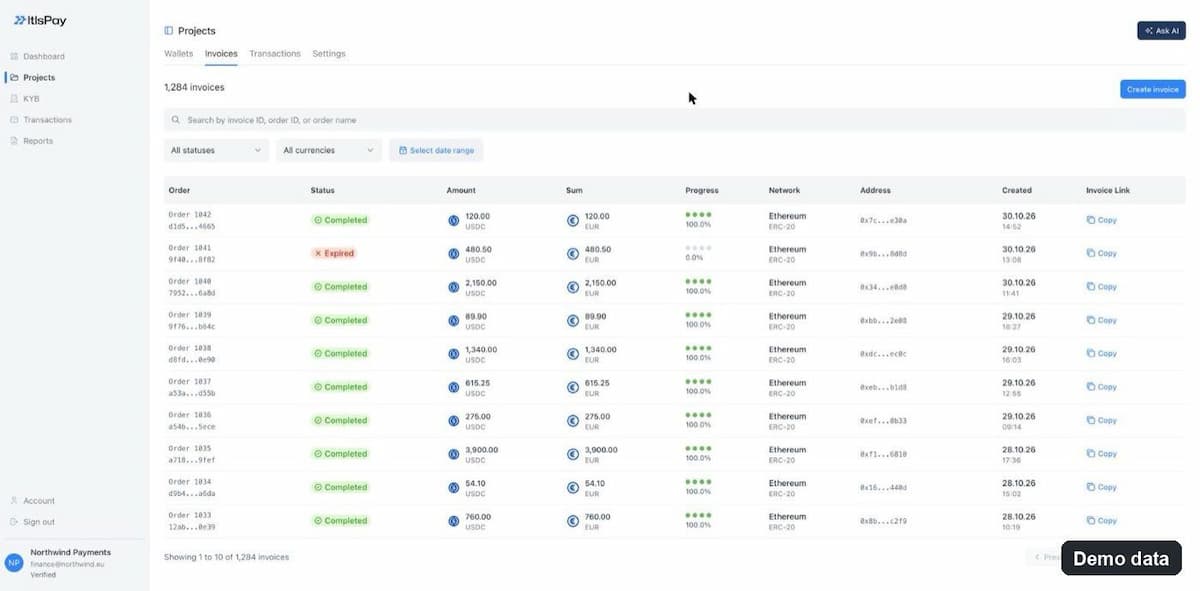
For the finance team, the invoice list is the reconciliation view. The API filters invoices by status, currency and creation date, up to 100 per page. The dashboard shows the same data: amount in USDC and EUR, share of the amount received, network, address and creation time, with search by invoice ID, order ID or order name.
For a wider look at automating crypto checkout beyond invoices, see our guide to accepting crypto payments automatically.
Where do stablecoin invoices fall short?#
Stablecoin invoices suit payers who already hold USDC: crypto businesses, cross-border B2B clients, and customers card acquirers turn away. They replace card checkout only partly, and a few limits should shape your terms.
Where it does not help
- Refunds are new transfers. There is no card-style chargeback; you send the money back yourself, to an address the payer confirms.
- A payment sent on the wrong network is not credited to the invoice and may be lost. Show the network clearly.
- Customers without a wallet or exchange account cannot pay this way. Keep a second payment method.
- USDT does not appear in ESMA's register of authorised e-money token issuers. ESMA told CASPs in January 2025 to stop exchanging non-compliant stablecoins for funds, so plan for USDC.
Demand is real but concentrated. ECB President Christine Lagarde said in a speech at the Banco de España LatAm Economic Forum on 8 May 2026 that cross-border business-to-business payments "already account for around 60% of stablecoin payment volume", adding that this is "just 0.01 % of global business-to-business flows". If your payers are in that group, an invoice flow is worth adding.
How to accept stablecoin payments: set up before the first invoice#
To accept stablecoin payments without surprises, decide four things before you write code: the expiry window for each sales channel, the payment-error tolerance, your policy for paid_partial and for payments in the wrong coin, and who on the finance team owns reconciliation. Then build the webhook handler, test it with simulated statuses, and run one small real payment end to end.
If you want to accept stablecoins and receive euros without building the stack yourself, ItisPay provides the API, invoicing and reconciliation. Licensing, KYC and settlement to your IBAN run through our EU-licensed CASP + Payment Institution partner, and most teams go from KYB to first transaction in under a week.
This article is for informational purposes only and does not constitute legal or regulatory advice.